 Home
Home

Configuration Options :: Overall Structure & Geometry
Adjust the creations CageMaker PRCG generates to best suit their use case.
manual support cage base size
This setting controls the geometry of the cage proper, ranging from a simple box to exaggerated plus-shaped corners for additional rigidity. Reducing this setting makes the cage smaller, which allows for a taller device before increasing the cage height by another unit, but trades structural strength for compact size. The default setting is suitable for most devices up to around 3Kg/7 lbs. and 150mm in depth - increasing this setting and/or surface thickness below may be needed for longer and/or heavier devices.

Selecting a device preset will override this setting.

With the surface thickness setting left at its default value, this setting will create a cage that adds 12mm plus the value of the device clearance setting (0.5mm by default) to the size of the device, and for EIA-310 standard racks this results in the maximum device height to keep the cage at one unit of height (or, 44.45mm) being 32mm. Reducing this setting to the "plain box" option will reduce the cage size to 8mm, and the maximum device height to fit into one unit becomes 36mm.
This setting pairs well with the options that make the bottom, sides, and top solid for moderately heavy devices that don't have ventilation requirements for their top/bottom/sides.
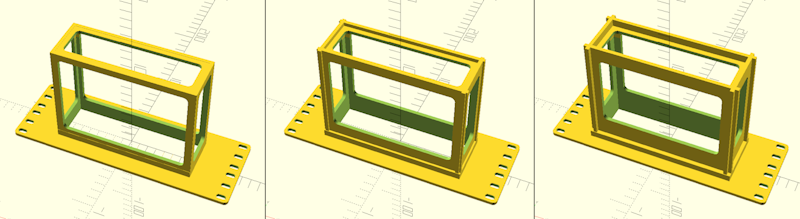
manual surface thickness
This setting determines the thickness of the surfaces generated by CageMaker PRCG. By default, this is 4mm, but for heavier devices this setting can increase that value to 5mm, 6mm, or 8mm and for lighter devices this can be lowered to 3.175mm (or 1/8"). Note that while this will make a stronger cage, it will also consume more filament and take longer to print.
Selecting a device preset will override this setting.
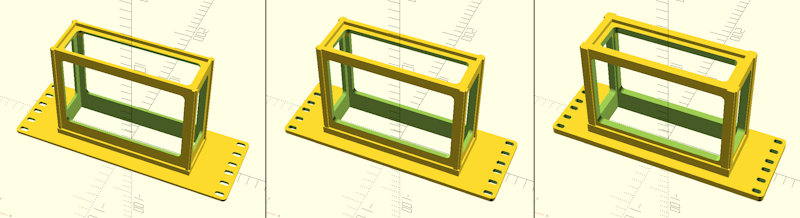
 Back To Top
 Navigate Site
 Source Code
 Support This Project
 Community
 Legal Notices & Information
 Copyright/Trademarks